FTC Affiliate Disclosure
Disclosure: This review contains affiliate links. If you click through and make a purchase, I may earn a small commission at no extra cost to you. I only recommend tools I have personally tested and vetted for content creators. Thank you for supporting the site!
Gling AI Review: The Ultimate Auto Jump-Cut & Subtitle Tool for Video Creators
If you produce talking-head YouTube videos, podcasts, or online courses, you already know the most soul-crushing part of the workflow: editing out silences, stutters, and bad takes. Spending two hours meticulously scrubbing through a timeline just to trim dead air before you even start adding graphics or music is an exhausting process that drains your creative energy.
Enter Gling, an AI-powered desktop application engineered specifically to automate the tedious rough-cut phase of video editing.
In this comprehensive review, we will break down Gling’s features, performance, pricing, real-world usability, and whether it deserves a permanent spot in your post-production stack. We recently put the software to the test to see if it lives up to the hype, and the results—along with a few crucial limitations for non-English creators—are detailed below.
What is Gling? An Overview for Video Creators
Gling is a specialized AI video editor designed for creators who record heavily spoken content. Unlike general-purpose video editing software that tries to do everything, Gling focuses heavily on solving specific, acute pain points: turning raw, unedited footage into a clean, tight rough cut in minutes, and enriching it with automated elements.
When recording videos, most creators repeat sentences when they stumble, pause to gather their thoughts, or leave long silences while adjusting equipment. Traditionally, removing these errors requires importing raw footage into a Non-Linear Editor (NLE) like Premiere Pro, listening through the entire recording in real-time, and manually setting blade cuts. For a 20-minute raw recording, manual trimming often takes 45 to 90 minutes. Gling automates this entire sequence using advanced speech recognition and natural language processing.
Core Features of Gling AI
1. Automated Silence and Bad Take Removal
When you upload your raw video or audio file, Gling automatically transcribes the audio and uses algorithms to detect pauses, filler words, and repeated takes.
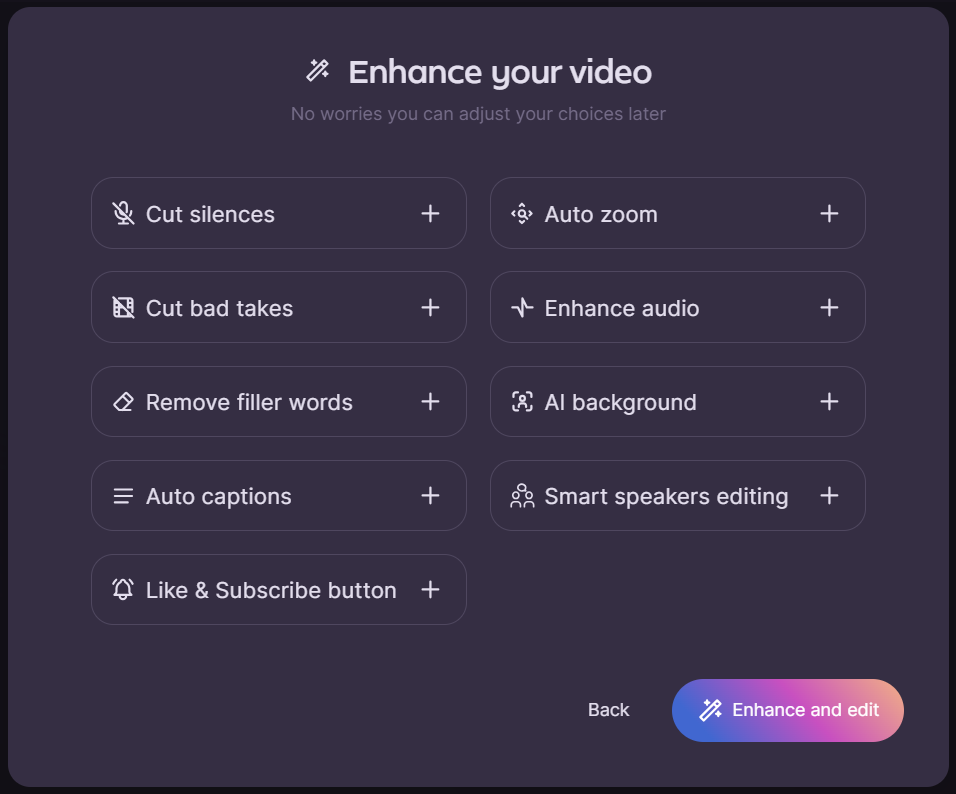
Before the AI even processes the timeline, the “Enhance your video” menu allows you to toggle exactly what you want the AI to handle. You can command it to cut silences, remove bad takes, eliminate filler words, apply auto-zoom, and even utilize smart speaker editing for multi-cam setups. It intelligently keeps the best take while marking the flawed attempts for deletion.
2. Instant Subtitles and Dynamic B-Roll Suggestions
One of the most impressive standout features of Gling is its post-cut processing capabilities. The moment your rough cut is generated, the software instantly applies accurate subtitles to the entire video.
But it goes a step further: Gling analyzes the context of your speech and automatically proposes natural, highly relevant B-roll footage tailored to specific scenes. Instead of spending hours scouring stock footage sites for the perfect contextual clip, the AI drops suitable visual overlays right into your timeline, dramatically enhancing the production value with zero extra effort on your end.
3. The Text-Based Editing Interface
Instead of forcing you to work exclusively on a complex multi-track timeline, Gling presents your video primarily as a text transcript.
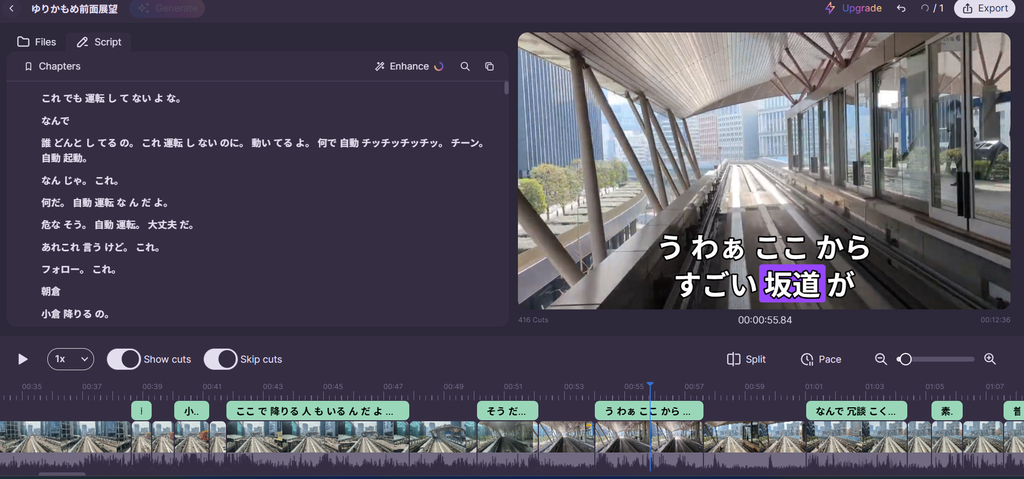
As you can see in the interface, the AI highlights silence gaps and detected bad takes (pre-selected for deletion). If you highlight any text and press Delete, the corresponding video clip is instantly removed from the timeline below. It is completely non-destructive; if the AI accidentally marked a good line as a bad take, clicking on the text restores it back into the edit immediately.
Hands-On Experience: Real-World Testing & Setup
To evaluate Gling’s real-world accuracy and onboarding friction, we ran it through a practical test.
Setup Speed: Ready in 60 Seconds
Nobody likes a bloated onboarding process. One of the biggest highlights during our test was the setup time. By simply linking a Google account, the entire registration and initial configuration took exactly one minute. You can go from discovering the software to importing your first video almost instantaneously.
The Catch: Where Gling Falls Short
While Gling is nothing short of a magic trick for English content, we rigorously test software to find its breaking points. During our hands-on experience, we noticed a distinct limitation regarding non-English language support.
Specifically, the Japanese voice recognition accuracy was slightly weak. The AI occasionally struggled to perfectly transcribe certain nuances, particles, or rapid-fire Japanese dialogue compared to its flawless English counterpart. If you are a creator producing content in Japanese, you will need to spend a bit more time manually proofreading the text transcript and correcting the auto-generated captions before exporting. It still saves time on the jump cuts, but the transcript itself will require human oversight.
Seamless Export Options (NLE Integration)
Gling understands that it is a pre-processing engine, not a final-destination editor. Once your rough cut, captions, and B-rolls are ready, the export functionality is arguably the most robust we have seen in an AI tool.
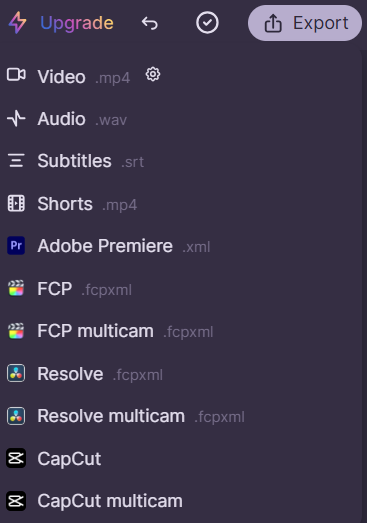
You are not locked into the Gling ecosystem. The platform allows you to export your project in multiple formats:
- Standard Media: MP4 (Video), WAV (Audio), SRT (Subtitles), and dedicated Shorts formats.
- Professional NLEs: Adobe Premiere Pro (.xml), Final Cut Pro (.fcpxml), and DaVinci Resolve.
- Modern Editors: It even features direct multi-cam exports and native CapCut integration.
When you open the exported XML file in your primary video editor, all cuts appear as native edits on your timeline. Your audio remains uncompressed, and you retain complete creative control to proceed with color grading, advanced audio mixing, and motion graphics.
Pros and Cons of Gling
Pros
- Ultra-Fast Setup: Account creation via Google integration takes just one minute.
- Massive Time Saver: Reduces rough-cut editing time by up to 80%.
- Instant Value Adds: Generates immediate subtitles and highly relevant B-roll suggestions based on context.
- Unbeatable NLE Compatibility: Native XML integration for Premiere, Final Cut, Resolve, and CapCut.
- Non-Destructive Workflow: Easily restore clipped audio/video with a single click in a text-based UI.
Cons
- Language Recognition Limitations: Voice recognition accuracy for languages like Japanese is notably weaker and requires manual correction.
- Internet Dependency: Cloud-based processing requires an active and stable internet connection.
Gling Pricing & Plans: Is It Worth It?
Gling offers a straightforward pricing structure designed for both casual creators and active video editors:
- Free Trial: Your first video edit is completely free, allowing you to test the engine with zero financial commitment to see if it fits your workflow.
- Monthly Subscription ($15 / month): Includes up to 10 hours of video processing per month. Unused hours do not roll over, but additional time can be purchased if needed.
- Annual Subscription ($12 / month billed annually): Provides the same 10 hours per month at a discounted rate.
Considering that a freelance video editor might charge $30 to $50 an hour just to do rough cuts, saving multiple hours per video easily offsets the $15 monthly cost. The return on investment is immediate for anyone producing weekly content.
Final Verdict: Should You Buy Gling?
If you are a solo content creator, YouTuber, podcaster, or video editor handling talking-head footage (especially in English), Gling is an absolute game-changer.
It does not try to be a flashy, feature-bloated video editor. Instead, it automates the most boring, repetitive task in video production with remarkable efficiency. Between the one-minute setup, instant auto-captions, contextual B-roll additions, and flawless XML exporting, Gling allows you to bypass the grunt work and focus entirely on creative storytelling.
Just keep in mind that if you are creating content in Japanese or other supported secondary languages, you should expect to spend a few extra minutes tweaking the transcript accuracy.
Our Recommendation: Take advantage of the free trial. Upload your messiest raw video file and experience firsthand how incredibly fast your post-production workflow can become.